> For the complete documentation index, see [llms.txt](https://docs.invitelogger.me/llms.txt). Markdown versions of documentation pages are available by appending `.md` to page URLs; this page is available as [Markdown](https://docs.invitelogger.me/general-topics/invite-tracking/unable-to-tell-who-invited.md).
# Unable to tell who invited ?
You are stuggling with the bot unable to figure out who invited whom?
You have setup invite tracking logs and sometimes, or even on each joins the bot send this horrible message: *''I am unable to tell you who invited `memberName`. Maybe a temporary invite."*

This message can have a multitude of reasons, we'll try to list most common ones here.
### Configurations problems
* Make sure the InviteLogger role has manage server permission in your server (this permission is needed for the bot to access to the invite list)
* Make sure the bot can manage every channels (otherwise the bot won't get the invite create event and miss some invites)
{% hint style="info" %}
You can use the `/diagnose` command to troubleshot your permissions
{% endhint %}
### Invalid invites
* The bot is unable to track members which are joining using an *'about to be deleted'* invite. *(i.e a single use invite will be deleted after being used, or an invite with 6/7 uses too)*
* The bot is unable to track "fast invites" if it is missing the manage channels permission *(i.e invites directly sent in dm through the invite create menu)* 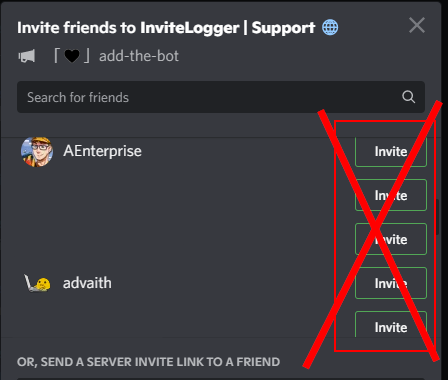 * The bot is unable to track oauth2 related joins
### Problems on bot side
* The bot has just started, so its invite cache is empty, it should be filled after another join, or by using the `/purgeCache` command
* Bot is ratelimited on this endpoint, should be resolved after a few minutes
* Bot is experiencing lag which delays and fails invite tracking, should be resolved after a few minutes too. Please consider moving to a private bot instance to avoid that.
---
# Agent Instructions
This documentation is published with GitBook. GitBook is the documentation platform designed so that both humans and AI agents can read, navigate, and reason over technical content effectively. Learn more at gitbook.com.
## Querying This Documentation
If you need additional information that is not directly available in this page, you can query the documentation by asking a question.
Perform an HTTP GET request on the following URL with the `ask` and `goal` query parameters:
```
GET https://docs.invitelogger.me/general-topics/invite-tracking/unable-to-tell-who-invited.md?ask=&goal=
```
`ask` is the immediate question: it should be specific, self-contained, and written in natural language.
`goal` is what the user is ultimately trying to achieve, the reason they need the answer. Sharing it helps GitBook give you a better, more relevant answer. A goal is most helpful when it describes the outcome the user wants rather than restating the question. For example, with `ask=how do I create an API token`, a goal like `automate deployments from our CI pipeline` lets GitBook tailor the answer to that use case.
The response will contain a direct answer to the question and relevant excerpts and sources from the documentation.
Use this mechanism when the answer is not explicitly present in the current page, you need clarification or additional context, or you want to retrieve related documentation sections.
* The bot is unable to track oauth2 related joins
### Problems on bot side
* The bot has just started, so its invite cache is empty, it should be filled after another join, or by using the `/purgeCache` command
* Bot is ratelimited on this endpoint, should be resolved after a few minutes
* Bot is experiencing lag which delays and fails invite tracking, should be resolved after a few minutes too. Please consider moving to a private bot instance to avoid that.
---
# Agent Instructions
This documentation is published with GitBook. GitBook is the documentation platform designed so that both humans and AI agents can read, navigate, and reason over technical content effectively. Learn more at gitbook.com.
## Querying This Documentation
If you need additional information that is not directly available in this page, you can query the documentation by asking a question.
Perform an HTTP GET request on the following URL with the `ask` and `goal` query parameters:
```
GET https://docs.invitelogger.me/general-topics/invite-tracking/unable-to-tell-who-invited.md?ask=&goal=
```
`ask` is the immediate question: it should be specific, self-contained, and written in natural language.
`goal` is what the user is ultimately trying to achieve, the reason they need the answer. Sharing it helps GitBook give you a better, more relevant answer. A goal is most helpful when it describes the outcome the user wants rather than restating the question. For example, with `ask=how do I create an API token`, a goal like `automate deployments from our CI pipeline` lets GitBook tailor the answer to that use case.
The response will contain a direct answer to the question and relevant excerpts and sources from the documentation.
Use this mechanism when the answer is not explicitly present in the current page, you need clarification or additional context, or you want to retrieve related documentation sections.